 Back to Portfolio
Price Clarity
Overview
Lands’ End offers a number of promotions on the website, and we found that customers weren’t always clear on the price that they would finally pay. We wanted a way to add clarity to the customer’s experience of using promotions.
Additionally, our marketing teams wanted a way to be able to use the promotional discounts in their online shopping ads (PLA’s), to show customers lower prices before they got to the site. We needed an initiative that would solve both these problems.

Background
We knew from customer feedback that sometimes users were confused by our promotions, and didn't understand when products would be included in a promotion, due to the fact that sometimes promotions only applied to full price or sale products, and these are housed on the same PDP.
As such we as an e-commerce team felt that we needed to provide users with more clarity around what price they would pay for products that were included in a promotion, so they could shop more confidently. We also felt this would also help attract customers, as they would be incentivised by the discount.
We had some constraints for this initiaive.
- While we wanted to provide a UI solution to customers to help them understand prices, we also needed to find a way for these prices to be pulled into our ads in our paid channels, which limited the potential solutions, as Google and other online shopping platforms have strict rules for validating prices, which we needed to be careful to adhere to in our solution to avoid disallowals on our paid shopping accounts.
- We needed to find a way for the messaging to be dynamic, and integrate with our back end systems in such a way that the new process would be easy to adopt by our web content and merchandising teams.
User Interface
In order for Google to be able to correctly read the sale prices, we used structured markup to designate the functions of the various prices on the page. However we were told that this doesnt always work accurately and that it would be safest to have fallbacks in our styling that would help search engine ad crawlers to understand that our new messaging was for promotional prices.
These included:
- Ensuring the font size was the same as the regular price, and larger than other elements in the product properties area
- Using a red font colour
- Placing the price in a prominent position on the page
To account for this, the UI design of price clarity was fairly simple and functional, but it required several changes to the existing PDP in order to better align content at the top of the page, create better information hierarchy and generally provide a cleaner UI on the page:
Previous UI: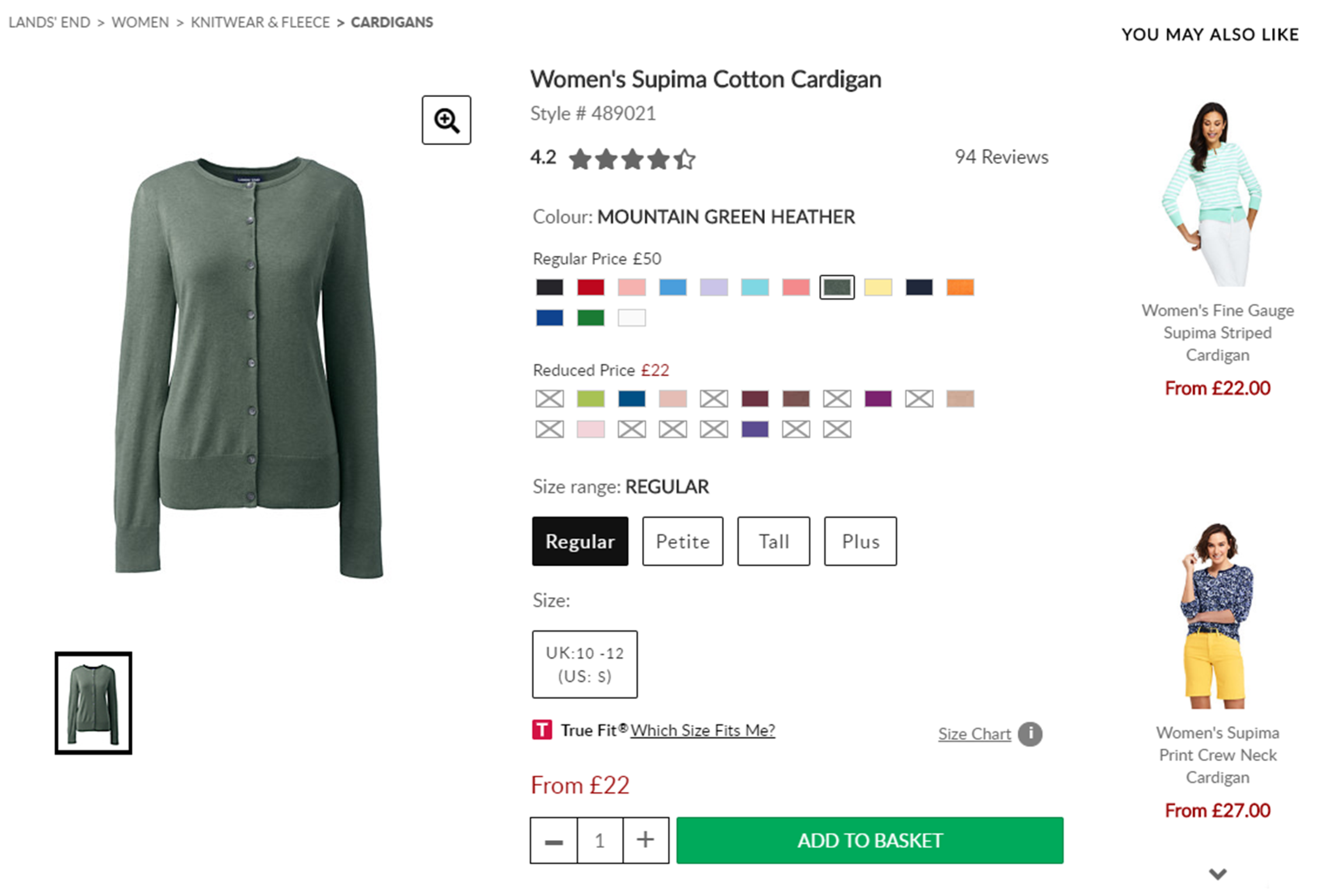 New UI:
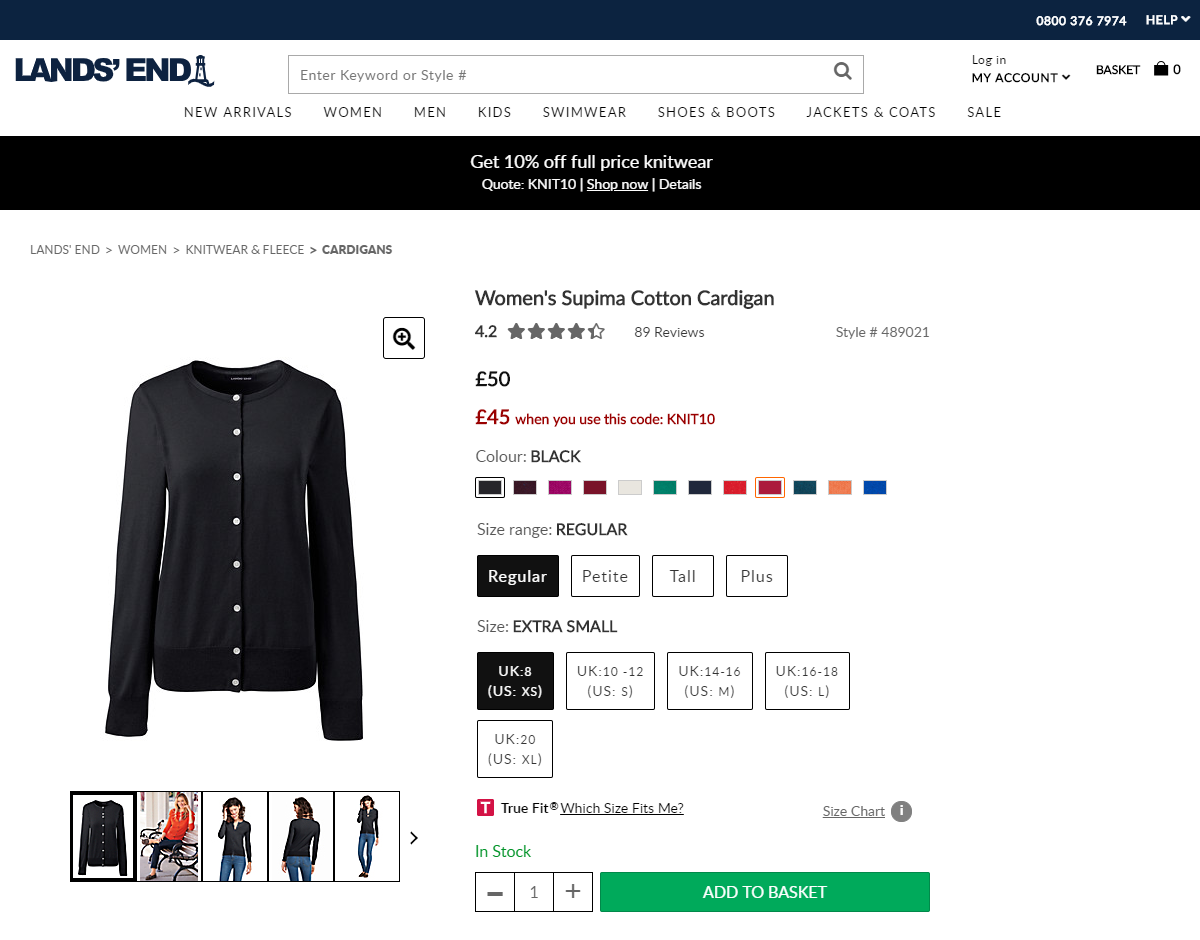
On PLP pages, we also provided a message to indicate to users that a product was in a promotion.
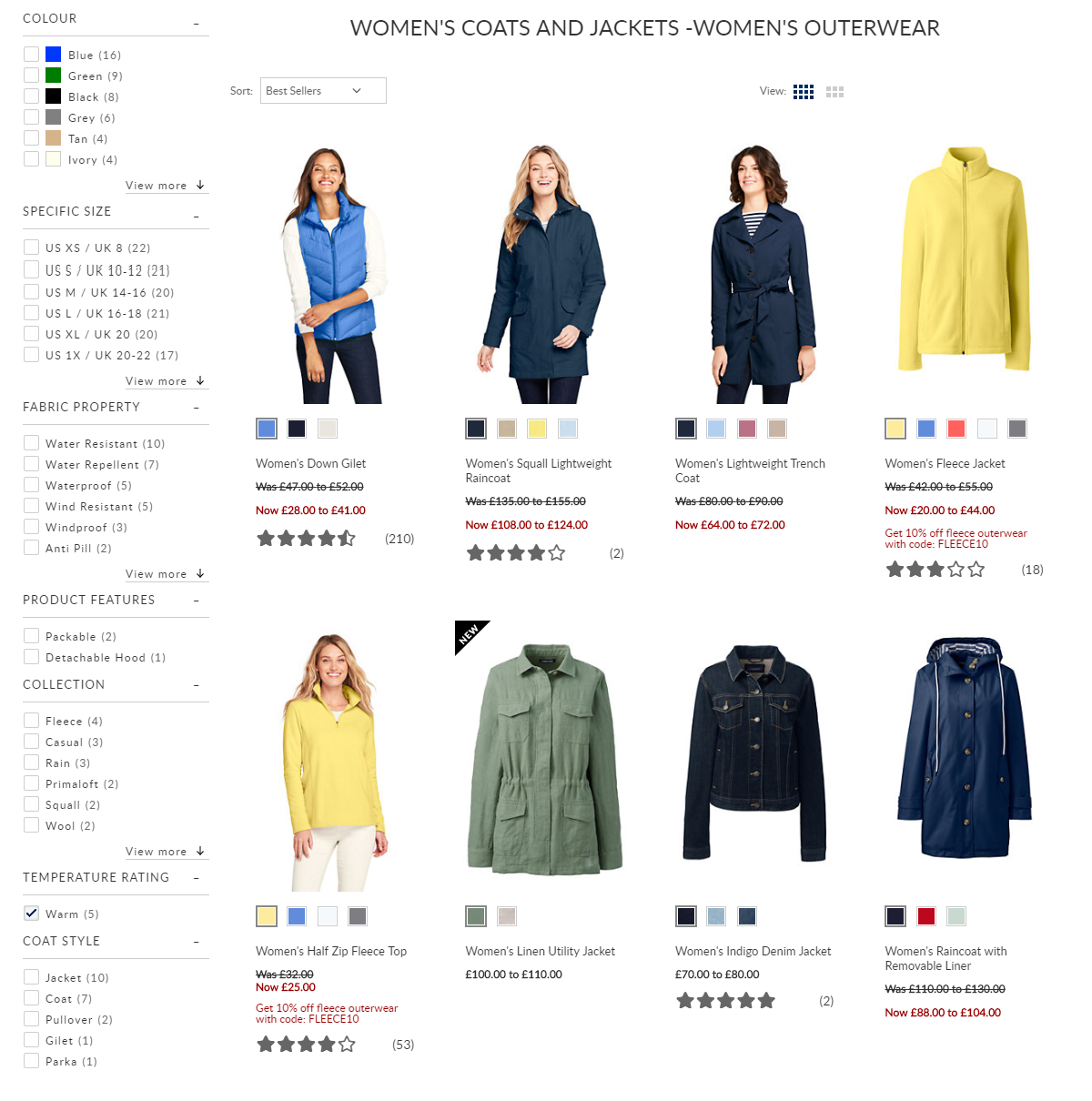
While the UI aspect was fairly basic, the biggest challenge with this project was integration with both our back end systems, and with our data feeds to support with PLA's.
Integration
There were several elements that needed to be considered for a cohesive experience across the customers journey.
Top banner
Previously, the web publishing team created a banner (e.g below, henceforth referred to as the ‘top promotional banner’) in Dynamic Yield upon business request.

There were two types that may be requested – site-wide banners, which show the same promotional message to all direct visitors to the website; and consistency banners which follow a customer from their originating traffic source (e.g. newsletter, retargeting) to show the same offer they’ve previously been advertised.
The web publishing team could add links, details, and change visuals – widely having full control over the banner content.
In order to show consistent messaging with price clarity, we needed the top promotional banner to be able to dynamically update to reflect either the primary promotion (the promotion designated to be shown to users by default) or the applied promotion so that price clarity message and top banner wouldn't conflict.
E.g previously, we might have had a 10% off (EXAMPLE10) primary promotion, which we generate a banner to promote in dynamic yield. If the customer then applies a promotion they’ve received elsewhere (EXAMPLE20), they would see messaging to reflect this promotion in price clarity (‘Get 20% off when you use coupon: EXAMPLE20’), but the sitewide banner would still be advertising the old promotion (‘Get 10% off when you use coupon: EXAMPLE10’) which presents a confusing set of mixed messages for the customer.
Dynamic Yield wasn't capable of integrating with the applied promotions onsite to achieve this, and therefore we need to move our banner provision into Demandware (the CMS), with the addition of new fields in the promotion set up.
I created a new set of fields to be used in Demandware, which would give the web publishing team the power to create a top promotional banner directly within the CMS, which would integrate with the primary or applied promotion. They could create all the banner information in one place, and due to the dynamic nature of fields I proposed, it would pull through into the correct places, but change if a promotion was applied so the customer would have a consistent experience.

This also allowed the marketing team to run specific promotions in emails. I had previously designed an 'auto apply' function that could be used to ensure the promotion was applied when the customer was taken to the website.
Due to the ability of the top banner to change when the promotion was applied, it meant that customers had a seamless experience whereby all promotional content on site was related to the promotion they were advertised in email.
Data Feed
For the price clarity information to show in paid shopping ads, I needed to design a way for the information held by the site to be conveyed to our marketing partners. We achieved this by making changes to the data feed which sent informaion back to these partners.
Each PDP would include a promotional price, promotional message and promotion code, and I instructed these to be coded as such that they could be dynamically pulled into the data feed. The promotion code would be used to generate an auto-apply promotion link, so that when the search crawlers visited the website using this link, the promotion code would be applied and all the information on the page would relate to the promotion we wanted advertised in our PLA's.
Using these new additions to the data feed, we needed to instruct our data feed provider to run scripts to optimise their feeds for relevant third parties to include price clarity for the periods when the promotions are visible onsite.
There may be times when the promotion had ended on site, but the PLA crawlers were still trying to validate the information we had previously sent. In order to mitigate the risk that information wouldn't match up to what we had sent previously, I instructed that an additional feed should be sent at the time of the promotion ending, which had no promotion code, messaging, or price; this would ensure that the information provided to crawlers was always accurate.
Results
Price clarity was successfully launched in September ’19 and our efforts to ensure that it was integrated with our PLA’s paid off. Our accounts did not face any disallowals, and in fact the optimisations made to our product structured data resulted in a reduction in product price warnings as a whole in our shopping account.
Over the time since price clarity launched, PLA conversion has been strong, and overall conversion onsite was up by 1% year on year, indicating a strong impact from price clarity.
